
Sound Recorder - Online Recorder, Record Online Stream Audio
Sonarca Sound Recorder Free is a CD Quality, free sound recorder. It is your wise choice for online stream recording
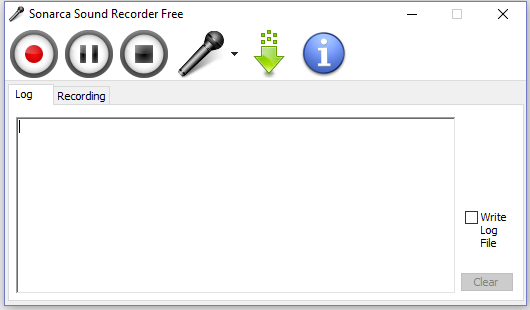

Sound Recorder - Key Features
- The best of all, it is a FREE sound recorder (for personal & home usage only).
- It Supports multiple sound input, audio/video files playback, CD player, line in, microphone, internet radio, even the obsolete tape/VHS cassette or anything else.
- It is also an online sound recorder to record online audio & video stream.
- This sound recorder is capable of recording various sound input to MP3 audio format.
- CD quality sound recording.
- Extremely resource friendly, CPU usage is below 1% on some new computers.
- Easy to navigate user interface designed for computer rookies to use.
- This free sound recorder uses the latest Lame MP3 encoder which is generally believed as the the best MP3 encoder.
- Supports majority of modern sound cards: multi channel/professional/external USB sound cards.
- Supports several sound cards at the same system.
- This Sound Recording freeware supports on-the-fly ripping, in other words, it does not generate temporary files during the ripping process.
- All events are logged for future diagnosis.
- The last but not the least, this Sound Recorder is Windows 10 compatible and works with Windows 7 (64-bit and 32-bit).
Upgrade to Sonarca Sound Recorder XiFi
NOTE: Sonarca Sound Recorder Free is FREEWARE, you can keep it as long as you wish and use it for any personal purpose and home usage. For additional features and commercial or public usage, please consider upgrading to the more powerful Sonarca Sound Recorder XiFi.
Highlights of Sonarca Sound Recorder XiFi
- High-Definition sound recording up to 192000Hz, stereo, 32bit.
- Record with our proprietary noise-suppression systems to maintain superior sound quality.
- Support all popular Windows audio interfaces like MME, DirectSound, WASAPI, Kernal Streaming for low latency recording.
- Supports WASAPI loopbak mode recording without introducing DAC quality loss.
- Record and save to dozens of audio formats.
- This sound recorder can seamlessly works together with user provided encoders.
- Scheduler and fully user defined Global Hotkeys for handsfree & longtime audio recording.
- Apply various DSP effects to the sound signal.

Sound Recorder - Version History
Thanks to everyone who reported bug(s) and/or gave suggestion(s)!
- V.3.2.6: (Jun 10, 2010)
- Added new feature: show recording progress and status on the Windows 7 taskbar.
- V.3.2.1: (Mar 30, 2010)
- Uptodate encoder: Lame 3.98.4, libOgg 1.2.0, libVorbis 1.3.1.
- V.3.1.6: (Feb 6, 2010)
- Changed the font to make the soft work under 800x600 resolution.
- V.3.1.3: (Jan 12, 2010)
- Fixed a file renaming bug.
- Fixed a bug which caused some unicode characters can not be properly displayed on the log tab.
- V.3.0.8: (Nov 8, 2009)
- Officially supports Windows 7 now.
- Fixed a volume control bug on Windows Vista.
- V.3.0.6: (Oct 20, 2009)
- Full unicode support.
- V.3.0.2: (Aug 18, 2009)
- Fixed a Vista UAC compatible issue.
- Improved the toolbar and statusbar.
- V.3.0.0: (Jul 25, 2009)
- First public release.
Sound Recorder - System Requirements
Minimum System Requirements
- Microsoft Windows 10/8.1/7 (32-bit and 64-bit)
- 1.0 GHz or faster processor
- 512 MB RAM
- 15 MB free hard drive space
- Sound Card
Recommended System Requirements
- Microsoft Windows 10/8.1/7 (64-bit)
- 1.8 GHz or faster processor(s)
- 1 GB RAM
- 15 MB free hard drive space
- Sound Card
- Windows Media Player 11 or later
- Administrator Privileges
Download Free Sound Recorder to Record Online Stream Now